Changelog

Follow new updates and improvements to Centify.

August 18th, 2025

New

Release Date: August 18, 2025


What's New

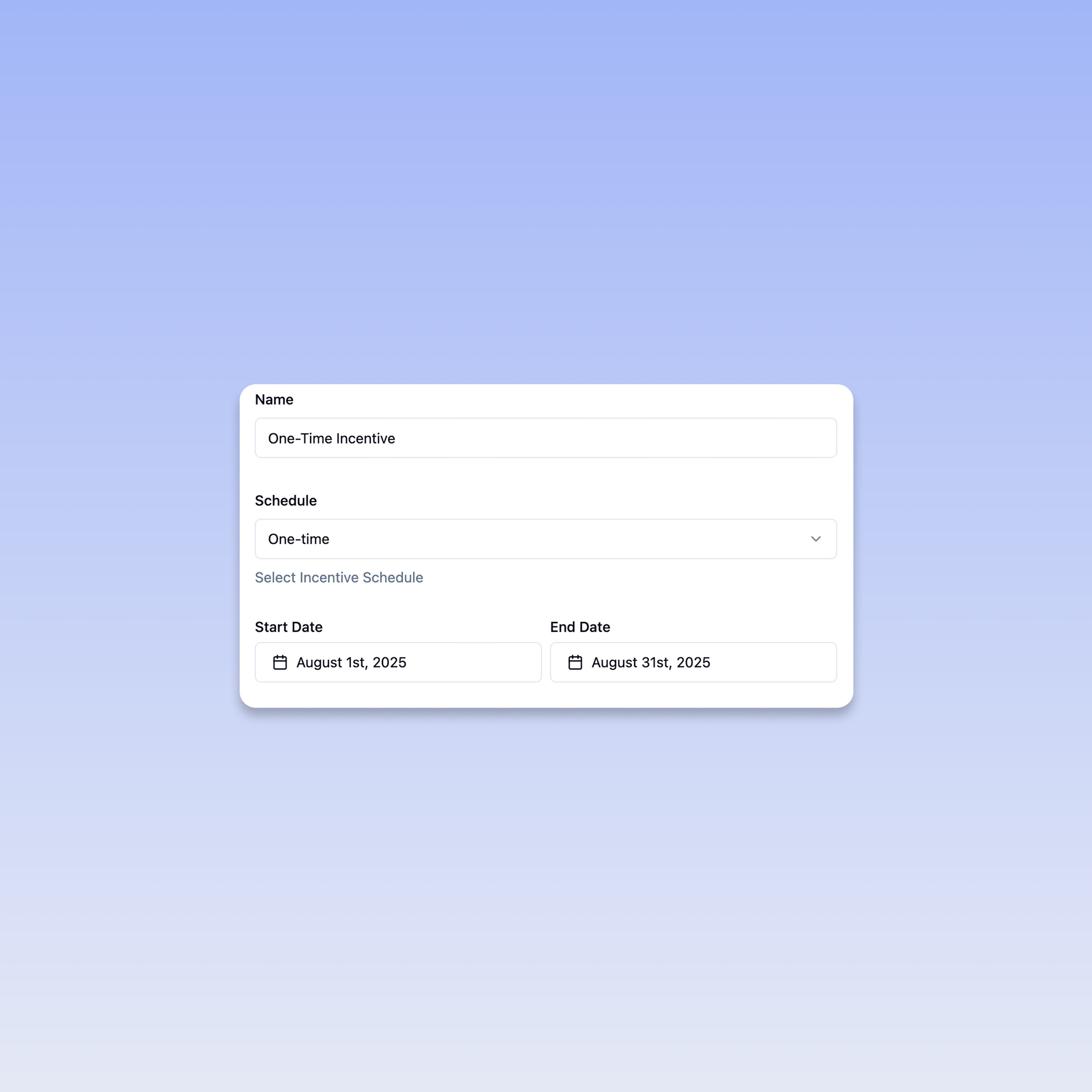
We're introducing One-Time Incentives in Centify! This feature allows you to create targeted, date-specific incentives that run for exact periods, perfect for sales contests, seasonal promotions, product launches, and special campaigns.

Key Features

⏰ Precise Date Control

  • Set exact start and end dates for your incentives

  • Perfect timing control for campaigns, contests, and promotions

How It Works

πŸ› οΈ Simple Setup Process

  1. Select Schedule Type: Choose "One-time" from the schedule dropdown

  2. Set Start Date: Pick the exact date your incentive begins

  3. Set End Date: Define when your incentive campaign concludes

Perfect For Sales Campaigns

πŸš€ Product Launches

  • Create excitement around new product introductions

  • Time incentives to match marketing campaigns

  • Drive focused effort during critical launch periods

πŸ† Sales Contests

  • Run monthly or quarterly competitions

  • Motivate performance during specific periods

🎁 Seasonal Promotions

  • Create urgency

  • Match incentives to customer buying patterns

Feedback

We'd love to hear how One-Time Incentives help drive your sales performance! Share your feedback with our product team through the in-app feedback widget.


Questions? Check out our Help Center or contact support for assistance with setting up your first one-time incentive.

July 28th, 2025

New

Release Date: July 28, 2025


What's New

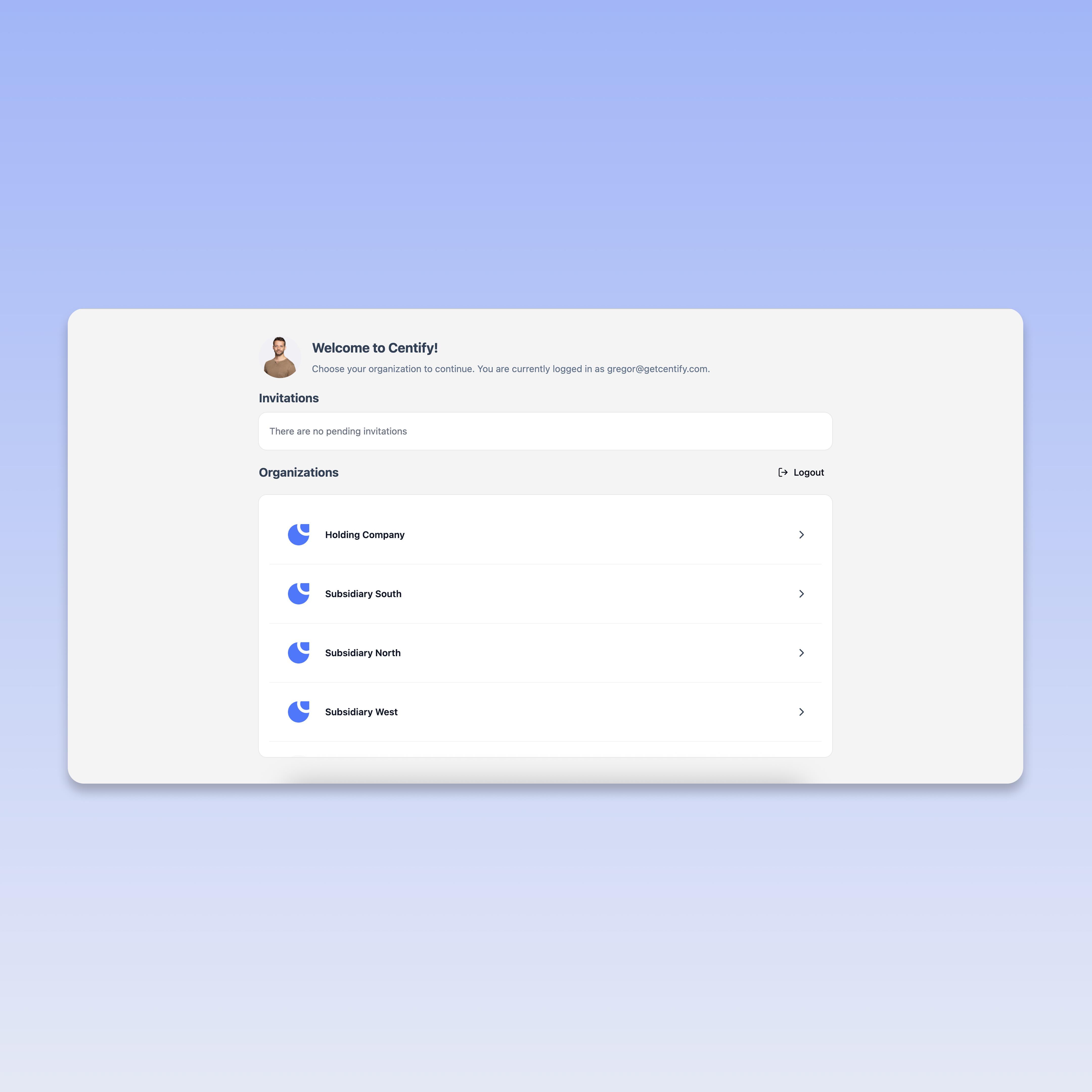
We're excited to announce the launch of Multi-Entity Management in Centify! This powerful new feature allows users to seamlessly manage commission structures across multiple organizations from a single dashboard.

Key Features

πŸ”„ Unified Organization Dashboard

  • Access all your organizations from one central location

  • Quick organization switching with a single click

πŸ‘€ Single Sign-On Across Entities

  • Secure access control across all entities

  • Maintained user permissions per organization

How It Works

  1. Login Once: Sign in to your Centify account as usual

  2. Choose Your Organization: Select from your available organizations on the welcome screen

  3. Switch Anytime: Easily navigate between organizations without re-authentication

  4. Manage Efficiently: Handle commission management across all your entities from one platform

Benefits for Your Business

⚑ Increased Efficiency

  • Reduce time spent switching between systems

  • Streamlined workflow for multi-entity businesses

  • Single source of truth for all commission data

πŸ”’ Enhanced Security

  • Centralized access management

  • Consistent security protocols across organizations

  • Reduced password complexity with single sign-on

πŸ“Š Better Visibility

  • Cross-organizational reporting capabilities

  • Consolidated view of commission performance

  • Easier compliance management across entities

Getting Started

If you manage multiple organizations, this feature is automatically available in your account. Simply log in to see your new organization selection screen.

Need help setting up additional organizations? Contact our support team at support@getcentify.com


Technical Notes

  • No disruption to existing commission calculations

  • All historical data remains intact

  • Existing API integrations continue to work seamlessly

Feedback

We'd love to hear how Multi-Entity Management improves your workflow! Share your feedback with our product through the in-app feedback widget.


Questions? Check out our Help Center or contact support for assistance with the new Multi-Entity Management feature.

July 15th, 2025

Improved

Release Date: Juli 15, 2025


What's New

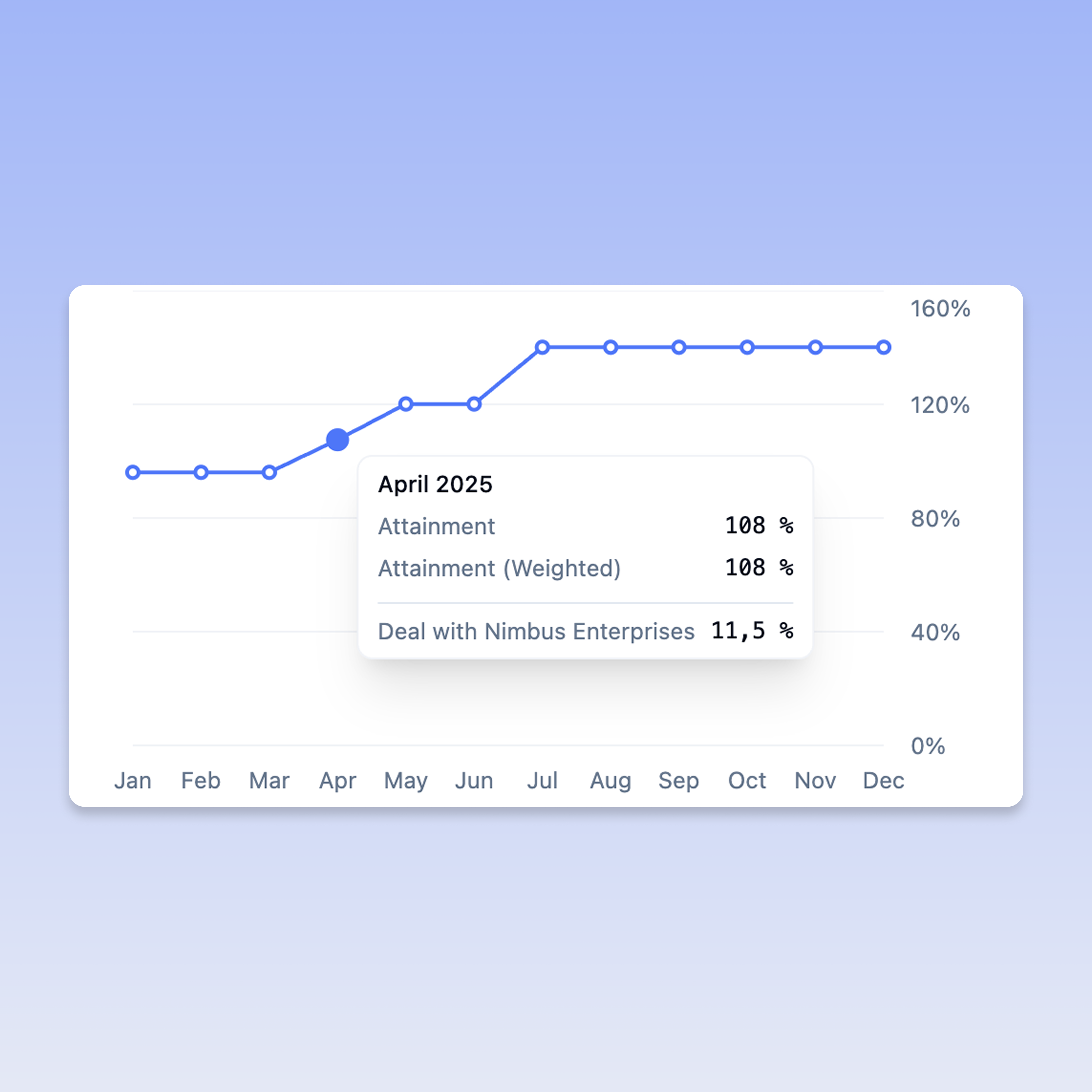
We're excited to introduce Visual Attainment Charts in Centify! This powerful visualization feature provides clear, graphical insights into deal attainment progress, making it easier than ever to track performance against targets.

Key Features

πŸ“Š Interactive Attainment Visualization

  • Beautiful line charts showing attainment progress over time

  • Real-time updates as deals progress through your pipeline

  • Clean, professional design optimized for performance tracking

πŸ“± Navigation

  • New "Chart" tab added to the Attainments section

  • Seamless switching between Overview, Deals, and Chart views

  • Deal count indicators for quick reference

How It Works

  1. Navigate to Attainments: Access your attainments as usual

  2. Select Chart Tab: Click on the new "Chart" tab to view your visual progress

  3. Analyze Performance: Review your attainment curve and identify trends

  4. Track Progress: Hover on the chart to get detailed insights

Benefits for Your Business

πŸ” Enhanced Visibility

  • Instantly see performance trends and patterns

  • Identify successful periods and areas for improvement

  • Visual confirmation of progress toward targets

⚑ Faster Decision Making

  • Quick visual assessment of attainment status

  • Spot performance trends at a glance

  • Better forecasting based on historical progression

πŸ“Š Improved Reporting

  • Professional charts perfect for stakeholder presentations

  • Clear visual evidence of team performance

  • Easy-to-understand progress indicators

Pro Tip: Use the Chart view during team meetings and performance reviews to provide clear visual context for discussions.


Technical Notes

  • Charts render in real-time based on your latest deal data

  • Responsive design works perfectly on all device sizes

  • No impact on existing attainment calculations or workflows

Feedback

We'd love to see how Visual Attainment Charts help you track and communicate performance! Share your feedback with our product team through the in-app feedback widget.


Questions? Check out our Help Center or contact support for assistance with the new Visual Attainment Charts feature.

July 10th, 2025

New

Release Date: Juli 10, 2025


What's New

We're thrilled to announce Centify Mobile - a fully optimized mobile browser experience! Access all your commission data on-the-go with a responsive interface designed specifically for smartphones and tablets.

Key Features

πŸ“± Native-Quality Mobile Experience

  • Optimized responsive design that works seamlessly in any mobile browser

  • Touch-friendly interface with intuitive gestures and navigation

  • Fast loading times optimized for mobile networks

🎯 Complete Feature Access

  • All desktop functionality available on mobile

  • Full deal management and tracking capabilities

How to Access

Getting started with Centify Mobile is simple:

  1. Open Your Mobile Browser: Use Safari, Chrome, or any modern mobile browser

  2. Visit Centify: Navigate to your usual Centify login page

  3. Experience the Difference: Enjoy the automatically optimized mobile interface

  4. Add to Home Screen: For the best experience, add Centify to your home screen

Benefits for Your Business

🌍 Work From Anywhere

  • Access commission data right after client meetings

  • Stay informed with real-time notifications

πŸ‘₯ Enhanced Team Collaboration

  • Better communication with instant data access

Getting Started

The mobile experience is automatically available - no app download required:

  • iOS Users: Works perfectly in Safari and Chrome

  • Android Users: Optimized for Chrome, Firefox, and Samsung Internet

  • Any Device: Responsive design adapts to tablets and smartphones

Pro Tip: Add Centify to your home screen for one-tap access and a native app-like experience!


Technical Notes

  • No app store download required - works through your existing browser

  • All security features maintained with mobile-optimized authentication

  • Seamless sync with desktop version - start on mobile, finish on desktop

Feedback

We'd love to hear how the mobile experience improves your daily workflow! Share your feedback with our product team through the in-app feedback widget.


Questions? Check out our Help Center or contact support for assistance with the new mobile experience.

July 9th, 2025

Improved

Release Date: Juli 09, 2025


What's New

We're excited to announce Multi-Domain Single Sign-On (SSO) for Centify! This powerful security enhancement allows organizations to configure multiple domains for SSO authentication, making it perfect for companies with acquisitions, subsidiaries, or multiple business units.

⚠️ Action Required: Before inviting users, you must configure at least one allowed SSO domain.

Key Features

🌐 Multiple Domain Support

  • Configure unlimited domains for SSO authentication

  • Support for parent companies and acquired subsidiaries

  • Seamless authentication across different organizational domains

πŸ”’ Enhanced Security

  • Highly secure SSO implementation with industry-standard protocols

  • Consistent security policies regardless of user domain

βš™οΈ Simple Domain Management

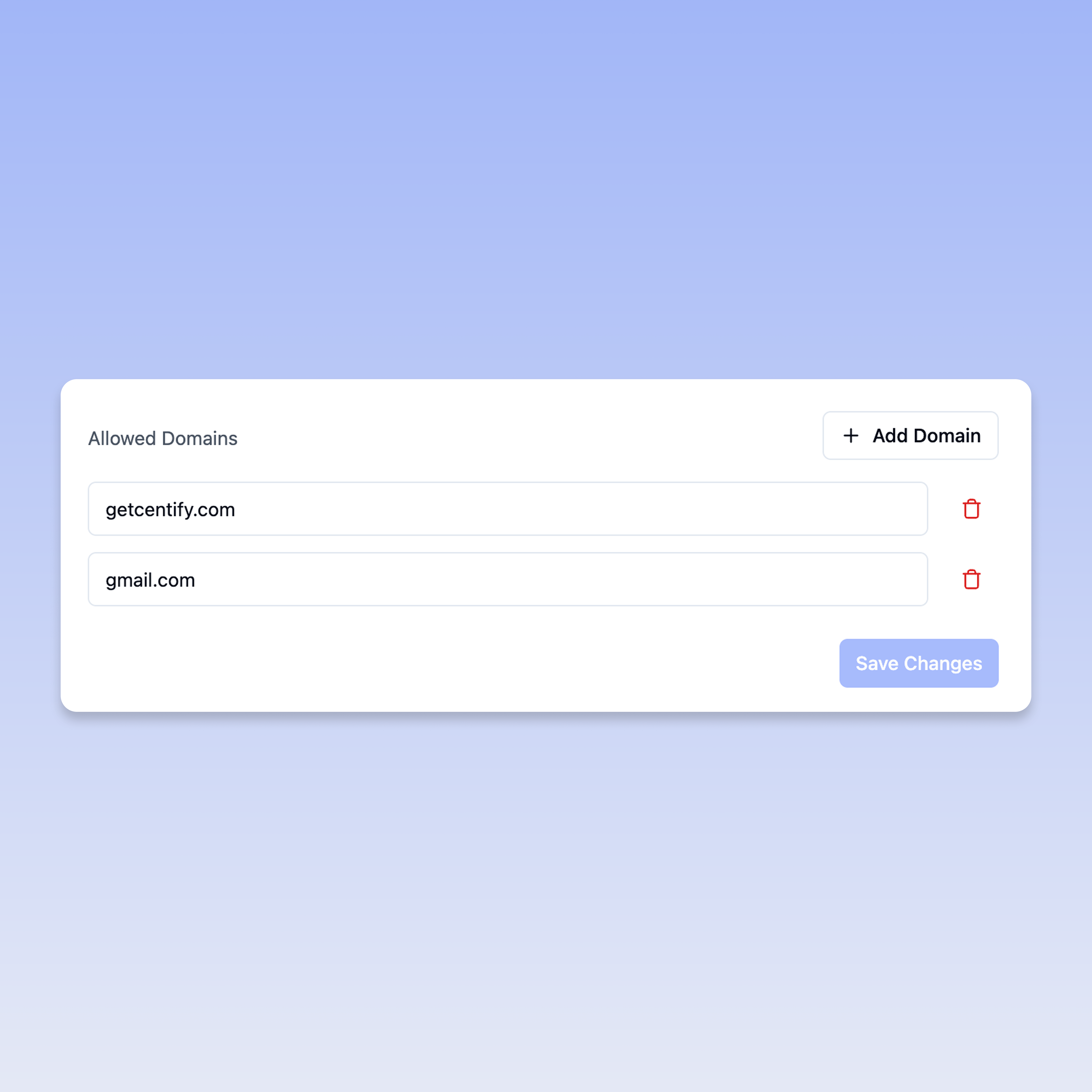
  • Easy-to-use interface for adding and removing allowed domains

  • Real-time domain validation and configuration

  • One-click domain removal when business needs change

How It Works

πŸ—οΈ Domain Configuration

  1. Access Settings: Navigate to your organization's Settings

  2. Add Domains: Use the "Add Domain" button to include new allowed domains

  3. Validate Setup: Each domain is automatically validated for proper SSO configuration

  4. Save Changes: Apply your domain settings with a single click

πŸ‘₯ User Authentication

  • Users from any configured domain can authenticate seamlessly

  • Automatic domain detection during login process

  • Consistent user experience regardless of email domain

Configuration Example

From the interface, you can easily manage domains like:

  • getcentify.com - Your primary corporate domain

  • gmail.com - For external consultants or temporary access

  • Additional domains as needed for acquisitions or partnerships

Benefits for Your Business

πŸš€ Streamlined Onboarding

  • New users from acquired companies can access Centify immediately

  • No complex email migration requirements

  • Faster integration of new team members

πŸ›‘οΈ Consistent Security

  • Same high-security standards across all domains

  • Centralized access control and monitoring

  • Reduced security vulnerabilities from multiple authentication systems

⏰ Reduced IT Overhead

  • Single SSO system to manage instead of multiple solutions

  • Simplified user provisioning and deprovisioning

  • Automated domain validation and security checks

πŸ“‹ Setup Steps

  1. Navigate to SSO Settings: Access your organization's security configuration

  2. Add Your Domains: Click "Add Domain" and enter your organization's domains

  3. Validate Configuration: Ensure each domain is properly configured for SSO

  4. Save Settings: Click "Save Changes" to apply your domain configuration

  5. Begin Inviting Users: Once domains are configured, you can invite users from any allowed domain

Feedback

We'd love to hear how Multi-Domain SSO simplifies your authentication management! Share your feedback with our product team through the in-app feedback widget.


Questions? Check out our Help Center or contact support for assistance with setting up Multi-Domain SSO.
June 25th, 2025

New

Release Date: June 25, 2025


What's New

We're excited to introduce Clawback Feature v1.0 in Centify! This powerful commission protection feature ensures that commissions are only paid out for customers who stay, automatically handling cancellations and protecting your business from paying commissions on churned customers.

🚨 Scope of v1.0

  • Affects: Target attainments and connected earnings not yet pushed to payout

  • Does Not Affect: Commissions already processed and paid out

Key Features

πŸ“Š Configurable Clawback Stages

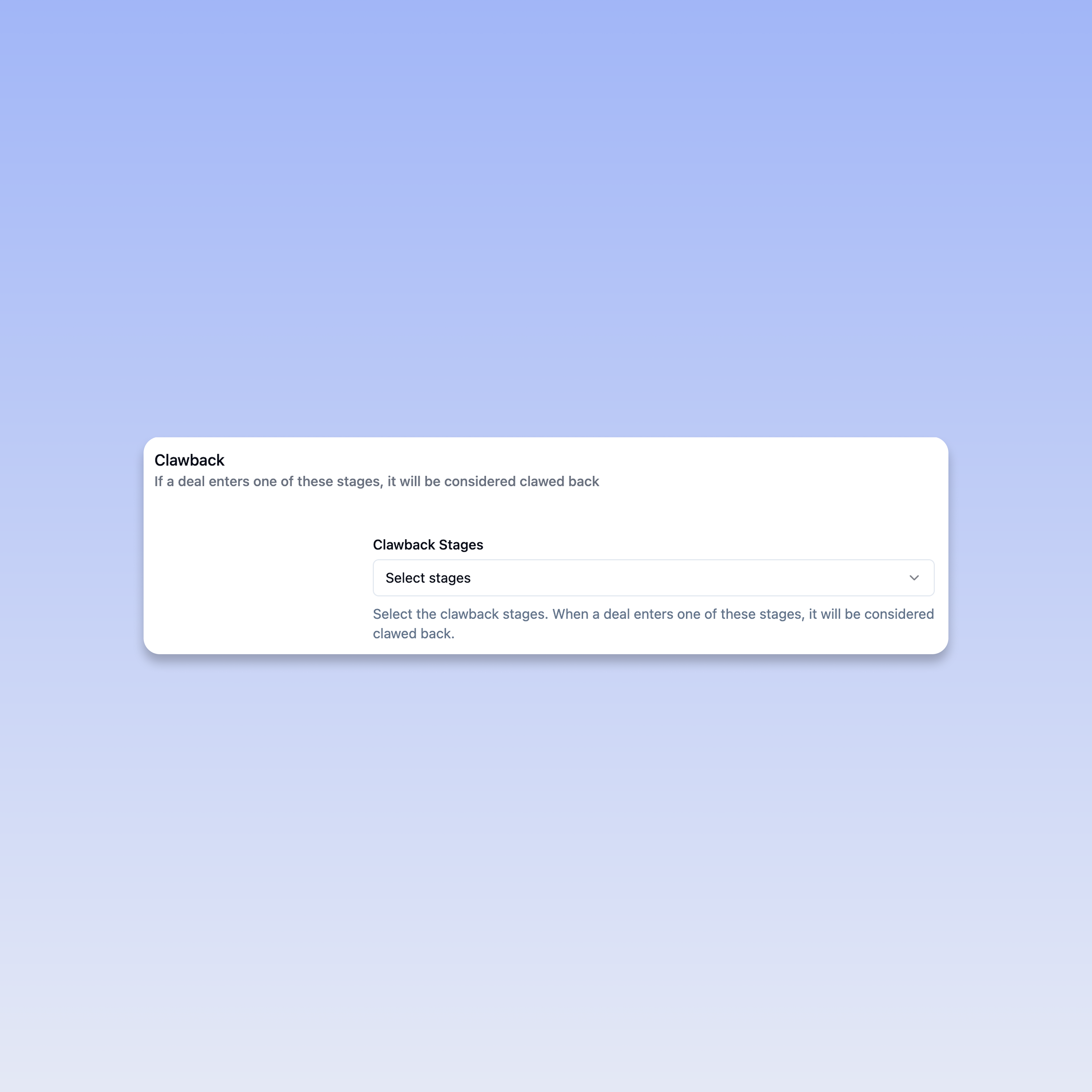
  • Define which deal stages should trigger clawbacks

  • Flexible stage selection to match your specific business process

  • Easy dropdown configuration for multiple stage selection

🎯 Target Attainments

  • Automatic adjustment of target attainments when deals enter clawback stages

  • A deal in the clawback stage is marked as red in the corresponding attainment

πŸ›‘οΈ Earnings

  • Only affects earnings that haven't been pushed to payout

  • Safe implementation that doesn't impact already processed commissions

How It Works

βš™οΈ Configuration Process

  1. Access Targets: Navigate to your target configuration

  2. Select Clawback Stages: Choose which deal stages indicate customer churn or cancellation

  3. Save Configuration: Apply settings

πŸ”„ Automatic Processing

  • When a deal enters a selected clawback stage, it's automatically flagged

  • Target attainments are recalculated in real-time

  • Connected earnings are adjusted before payout processing

Coming up

  • Retroactive clawback processing for already paid commissions

  • Time-based clawback rules (e.g., 90-day protection periods)


Feedback

We'd love to hear how Clawback v1.0 helps protect your commission accuracy! Share your feedback with our product team or through the in-app feedback widget.


Questions? Check out our Help Center or contact support for assistance with setting up clawbacks.